

 By
By When I first started exploring smart-home technology, I noticed something that can make the whole subject confusing: people often talk about smart devices, hubs, controllers, bridges, and ecosystems as if they were all the same thing.
They aren’t.
You can buy a smart bulb, connect a smart plug, install a door sensor, and add a thermostat. But once you have several devices, the real question becomes: How do I make all of these devices work together? That’s where a home automation controller comes in.
A controller can coordinate connected devices, process automation rules, and provide a central place to manage your smart home. Depending on the platform, some processing can happen locally in your home, while other systems rely more heavily on cloud services. (Amazon Developer) In this guide, I’ll break down what a home automation controller actually does, whether you need one, how different controllers work, what Matter means, and what I’d look for before choosing one.
What Is a Home Automation Controller?
A home automation controller is a device or software platform that manages and coordinates smart-home devices and automations.The controller can use information from your devices and sensors, apply rules you’ve created, and trigger actions automatically.
- For example: If motion is detected in the hallway after 10 PM → turn on the hallway light at 30% brightness. When everyone leaves home → lock the doors, turn off selected lights, and adjust the thermostat.
Visual idea:
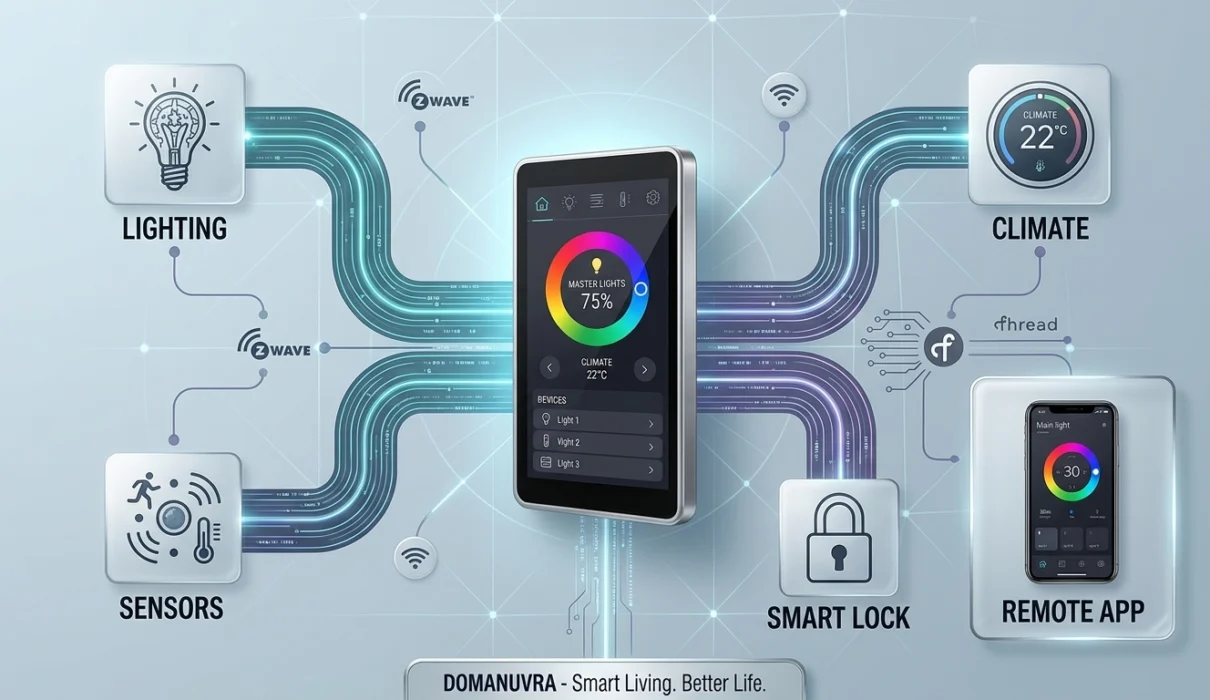
Think of It as the Brain of Your Smart Home
Motion sensors, door sensors, thermostats and other smart devices can tell the system what is happening in your home.
The controller takes information from your devices, checks the conditions you’ve created, and determines which action should happen.
The controller can then tell compatible devices to turn on, turn off, change settings, lock, unlock, or perform another supported action.
IF motion is detected in the hallway AND it is after 10 PM THEN turn the hallway light on at 30% brightness.
WHEN everyone leaves home THEN lock the doors, turn off selected lights, and adjust the thermostat to Eco mode.
Important: A controller doesn’t have to be a physical box. Depending on the ecosystem, it can be dedicated hub hardware, software running on your own hardware, or a smart-home platform built into another device.
Caption: A controller coordinates compatible devices and turns individual actions into automated routines.
How Does a Home Automation Controller Work?
At its simplest, automation can be understood as:
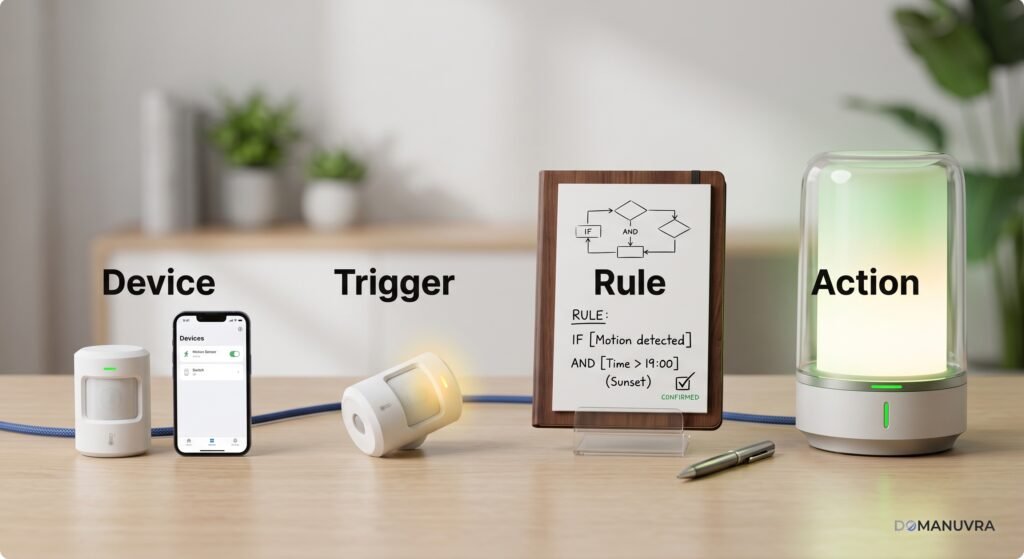
Let’s break that down.
1. Devices
These are the smart products connected to your home automation system.
2. Triggers
A trigger tells the system that something has happened.
3. Rules
The controller checks the conditions you’ve defined.
How IF / AND / THEN Rules Process
4. Actions
The controller sends the appropriate command to the device. The result could be a light turning on, a lock engaging, a thermostat changing temperature, or a notification being sent.
There are a simple graphic:
Trigger → Condition → Controller → Action
How Home Automation Works
See how a controller processes an automation rule.
This is one of the most important visuals in the entire article because a beginner can understand the concept without reading several paragraphs.
Do You Actually Need a Home Automation Controller?
Maybe not.
- This is where I think beginners should pause before buying anything.
- If you only have a couple of smart devices, you may be perfectly happy using their individual apps or a mainstream smart-home ecosystem. For example, compatible Amazon Echo devices can act as Matter administrators and connect compatible Matter devices locally through Wi-Fi or Thread.
- But as your smart home grows, a dedicated controller can become much more useful.
I’d start considering one when you want:
Make multiple devices work together.
Create automations with multiple conditions.
Get more control over devices from different brands.
Run important automations locally.
Build more advanced and flexible routines.
Manage your smart home from one place.
Customize your smart-home experience.
Quick decision
Do You Need a Home Automation Controller?
Answer a few simple questions to find out what makes sense for your smart home.
Do you have more than a few smart devices?
For example, smart lights, sensors, locks, plugs, cameras, or thermostats.
Do your devices come from different brands?
Different brands may require a controller to coordinate everything.
A Controller May Be Worth It
A dedicated home automation controller can help coordinate devices from different brands and create more advanced automations.
Your Existing Ecosystem May Be Enough
If most of your devices already work together, your current smart-home platform may handle your needs.
You Probably Don’t Need One Yet
With only a few compatible smart devices, your existing ecosystem may already provide everything you need.
Smart Home Hub vs Home Automation Controller
These terms are often used interchangeably, which causes a lot of confusion.
“A hub can act as the central connection point for devices, while a controller emphasizes the ability to manage devices and automation rules”. In practice, one product can perform both roles. The important thing isn’t what the manufacturer calls it. What matters is what the system actually supports.
Before buying, I’d ask:
Local vs Cloud Automation: What’s the Difference?
This is one of the most important decisions you’ll encounter.
Cloud-Based Automation
In a cloud-dependent system, some operations can rely on internet-connected services. This approach can make remote access and setup convenient, but the experience may depend more heavily on cloud availability and internet connectivity.
Local Automation
With local automation, the controller can process supported rules inside your home. This can provide advantages such as lower latency and continued operation for certain automations when the internet connection is unavailable.
Amazon for example, documents local Matter connections between compatible devices and Alexa, while Thread can provide an IP-based mesh network for compatible devices.
Why I would pay attention to this
- Imagine your internet connection goes down at midnight.
- If your hallway automation depends completely on the cloud, you may have a problem.
- If the relevant automation runs locally, the situation can be different.
But don’t assume “local” means every feature will continue working offline. Individual devices and integrations can still have cloud dependencies.
This visual would be extremely useful for beginners.
What Is Matter and Why Does It Matter?
If you’re researching a new home automation controller in 2026, you’ll probably come across Matter. Click here for more info about matter
Matter is an IP based smart home connectivity standard designed to improve interoperability between compatible devices from different manufacturers. Amazon supports Matter connections over Wi-Fi and Thread on compatible Alexa hardware. (Amazon Developer) That’s important because one of the biggest frustrations with smart homes has traditionally been compatibility.
You might buy:
Brand A light + Brand B sensor + Brand C switch and discover that they don’t work together the way you expected. Matter is intended to make compatible products easier to bring together across supported ecosystems.
But don’t make this mistake
Matter does not mean “everything works with everything.”
Compatibility still depends on the specific device type, platform, controller, firmware, and features supported. Amazon’s current Matter documentation lists supported categories including lighting, smart plugs, sensors, door locks, thermostats, appliances, and more.
Smart Motion Light Cycle
Simulating how Matter triggers lights locally and holds them ON before resetting.
What About Zigbee, Z-Wave, Wi-Fi, and Thread?
Matter isn't the only technology you'll encounter. You may also see:
| Technology | What to understand |
|---|---|
|
Wi-Fi
|
Common in smart devices and connects through your home network |
|
Zigbee
|
Low-power wireless technology widely used by smart-home devices |
|
Z-Wave
|
A smart-home wireless technology used by many hubs and automation products |
|
Thread
|
IP-based low-power mesh networking technology |
|
Matter
|
An interoperability/application standard that works over networks such as Wi-Fi and Thread |
Thread is specifically described by Amazon as an IPv6 wireless mesh networking technology intended for security, reliability, and scalability.
Why this matters when choosing a controller
Don't buy the controller first and think about devices afterward. I'd do the opposite:
That's one of the easiest ways to avoid an expensive compatibility headache.
What Should You Look for in a Home Automation Controller?
This is the section I'd bookmark if I were actually shopping.
1. Device Compatibility
This should be your first check. A controller is only useful if it can communicate with the products you want to use.
Check compatibility with:
- Existing devices
- Planned future devices
- Your preferred ecosystem
- Required protocols
2. Automation Features
Don't just ask: “Can it turn my lights on?”
Ask: “What can it automate?”
Look for support for things such as:
- Conditions
- Schedules
- Scenes
- Presence detection
- Sensor-based triggers
- Multiple actions
- Notifications
3. Local Processing
- If reliability, privacy, and response speed matter to you, find out which automations can run locally.
- Don't rely solely on the word “local” in marketing copy. Check exactly what works without internet access.
4. Matter Support
- If you're building a new system, Matter support is worth considering.
- Check the actual device categories and features supported by the controller rather than assuming every Matter feature will work.
5. Ease of Setup
A technically powerful system can still be a poor choice for a beginner if setup is unnecessarily complicated. Look at:
- App quality
- Installation process
- Documentation
- Community support
- Troubleshooting resources
6. Privacy
Understand where your data goes. Ask:
- Does the system require an online account?
- Are automations processed locally?
- What information goes to the manufacturer's cloud?
- Can the system operate if the internet goes down?
7. Future Expansion
Your smart home won't necessarily stay the same. Today you might have: 2 lights + 1 smart plug
A year later: lights + thermostat + locks + cameras + sensors + energy monitoring Choose a platform that can grow with you.
Different Types of Home Automation Controllers
There isn't one controller that's best for everyone. I'd divide the market into three broad approaches.
Beginner-Friendly Ecosystems
- These are designed around ease of setup and familiar platforms.
- They're attractive when you want voice control and straightforward device management without spending a lot of time configuring your system.
- Amazon Alexa, supports a broad range of smart-home device categories and Matter-compatible devices.
Dedicated Automation Hubs
- These are designed more specifically around automation and multi-device control.
- They're worth considering when you want more sophisticated rules and broader device integration.
DIY / Open Smart-Home Platforms
- Platforms such as Home Assistant are popular with people who want extensive customization and local control.
- This approach can offer enormous flexibility, but it generally demands more learning and configuration.
Important
Don't choose a platform because it has the longest feature list. Choose one whose complexity matches your needs.
Home Automation Controller Buying Checklist
Common Mistakes to Avoid
Buying the controller before checking compatibility
- This is probably the easiest mistake to make.
- Start with your existing devices and work backward.
Buying too many devices at once
- You don't need a smart version of everything.
- Start with a small number of devices and learn the ecosystem.
Ignoring local vs cloud operation
- Don't assume your automations will continue working during an internet outage.
- Check each important function.
Choosing based only on price
A cheaper controller that forces you into an ecosystem you don't like can become expensive later.
Chasing features you'll never use
- An advanced automation platform isn't automatically better.
- The right platform is the one that solves your problems without creating new ones.
What I Would Do as a Beginner
If I were starting a smart home from scratch, I'd keep the first setup simple.
5 Steps to Build a Reliable Smart Home
Avoid costly compatibility mistakes by following a structured, step-by-step approach.
Identify One Real Problem
Don't automate your whole house on day one. Pick a single friction point—like hallway lighting at night or porch security.
Select Your Communication Standard
Choose Zigbee, Thread, or Z-Wave for sensors and lights to avoid overloading your home Wi-Fi network.
Prioritize Local Processing
Ensure your hub (Home Assistant, HomePod, Nest) processes rules locally so automations work even when the internet goes out.
Build One Conditional Routine
Create a simple multi-condition rule to test stability:
Test for 2 Weeks Before Buying More
Live with your first setup for 14 days. Fix false triggers and refine rules before expanding into other rooms.
Then I'd expand based on what I actually need. I think this is much better than buying ten devices on day one and spending the weekend trying to figure out why they don't communicate with each other.
The value isn't the individual devices. The value comes from how intelligently they work together.
FAQ
Is a home automation controller the same as a smart-home hub?
Not always. The terms overlap, but a controller emphasizes automation and coordination logic, while a hub primarily focuses on connecting devices across different hardware protocols.
Can Alexa be a home automation controller?
Yes. Compatible Echo devices can act as Matter controllers and Thread Border Routers, executing basic local routines over Wi-Fi, Zigbee, or Thread.
Can a home automation controller work without the internet?
Many local-first controllers (like Home Assistant or Hubitat) run automations 100% offline. However, cloud-dependent hubs require an active internet connection for routines to trigger.
What is the best home automation controller?
There isn't a universal winner. The right choice depends on your existing hardware protocols (Zigbee/Z-Wave/Thread), desired offline privacy, setup complexity, and preferred app ecosystem.
Do I need a controller for a few smart devices?
No. If you only own a few Wi-Fi smart plugs or lights, standard smartphone apps (Apple Home, Google Home, Alexa) are more than enough without buying a dedicated controller.
Is Matter a controller?
No. Matter is an open interoperability protocol (a common language), not hardware. A Matter-compatible controller uses this standard to talk directly to your devices.
Final Thoughts
- A home automation controller isn't valuable simply because it gives you another app or another box to plug in.
- Its real value is bringing your smart-home devices together and allowing them to respond intelligently to the way you live.
- For a small setup, you may not need much more than the ecosystem you already use.
- For a growing smart home, however, a capable controller can become the central layer that connects devices, sensors, routines, and automations.
My biggest advice is simple:
Don't start by asking which controller is the most powerful. Start by asking what you want your home to do.
Once you know that, choosing the right controller becomes much easier.
2 Comments